dsh-live-mcp
在终端中运行以下命令:
dsh plugin install bingaha/dsh-live-mcp
将以下提示词粘贴到 DeepSeek Harness 对话框中:
在终端运行 dsh plugin install bingaha/dsh-live-mcp 即可安装,项目源码见 https://github.com/bingaha/dsh-live-mcp 。
插件介绍
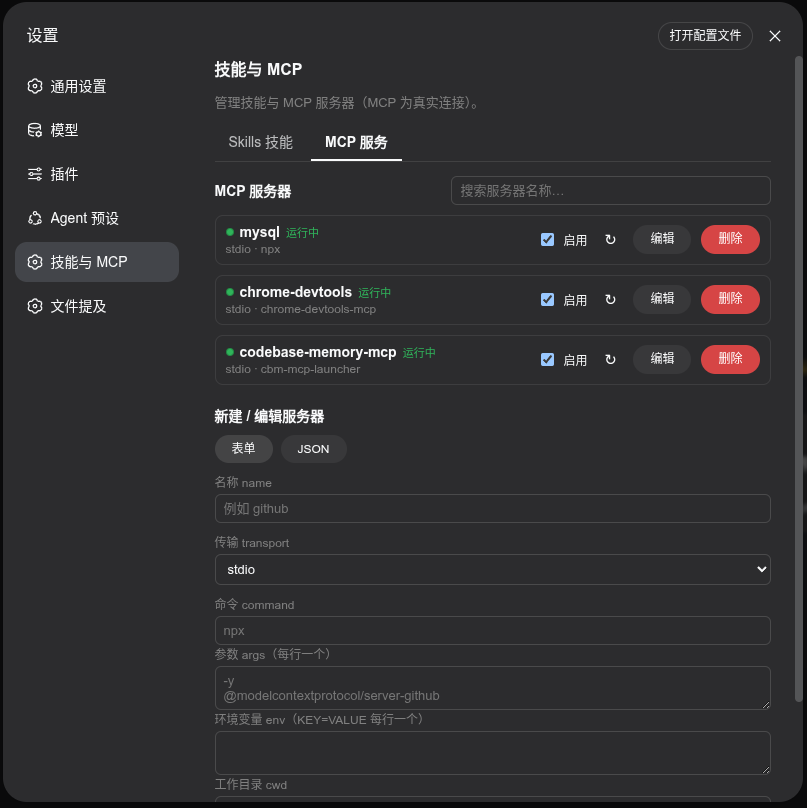
Managing multiple MCP servers in DeepSeek Harness is often clunky when the only granularity is global on/off. Different conversations frequently need entirely different tool sets, and repeatedly toggling global settings is tedious and risks disrupting other sessions. dsh-live-mcp brings MCP control down to the individual conversation: enable or disable any server within a chat, have the change take effect on the very next model request, and leave every other session untouched.
The plugin is built around three core use cases. First, per-session real-time control: a persistent capability bar above the input field shows the available MCP count and names at a glance; a single click toggles a server, and the side panel logs the tool-set change in the conversation trace. Second, full MCP and skill management: create, test, edit, and delete stdio and streamable-http servers via form or JSON, and browse, search, import, and inspect skills grouped by source. Third, skill invocation strategy visualisation: the plugin parses SKILL.md frontmatter automatically and renders model- and user-invocation restrictions as colour-coded badges, so you can judge availability at a glance without reading source.
If you juggle multiple projects or experiments in DeepSeek Harness and need to pair different MCP tool sets with different conversations while keeping a single place to manage skills and servers, dsh-live-mcp consolidates all of that with zero source-code intrusion and automatic cleanup when sessions are archived.
截图预览
使用场景
- 在同一工作区并行多个对话,每个会话使用不同的 MCP 工具集
- 对话中途临时启用或禁用某个 MCP 服务器,下一轮请求立即生效
- 浏览技能列表并按调用策略颜色标签快速判断可用性
适合人员
- 需要同时管理多个 MCP 服务器的 DeepSeek Harness 高级用户
- 希望按会话隔离工具集而不影响其他对话的开发者
- 需要在团队中统一维护技能与 MCP 配置的 DSH 管理员
相关插件

让 AI 编程代理更可信:编辑前对齐真实基线、完成时附验证证据,减少返工与不安全变更。

将 DeepSeek Harness 会话变为队长,创建持久子代理团队,将目标拆分为依赖感知任务,并通过直接消息与 Web UI 协调执行。
为编码智能体赋予设计判断力,让 Claude Code、Cursor 等 70+ 智能体直接在终端生成与迭代高质量 UI、演示文稿和图形。
让 Pi 生态的插件无需修改即可运行在 DeepSeek Harness 上,通过实现 Pi 公共扩展 ABI 的兼容层桥接两大生态,并检验 DSH 架构能力。