dsh-windows-shell-policy
在终端中运行以下命令:
dsh plugin install LAN-TINA-WS/dsh-windows-shell-policy
将以下提示词粘贴到 DeepSeek Harness 对话框中:
请在 DeepSeek Harness 中运行命令 dsh plugin install LAN-TINA-WS/dsh-windows-shell-policy,或访问 https://github.com/LAN-TINA-WS/dsh-windows-shell-policy 获取完整安装指南。
插件介绍
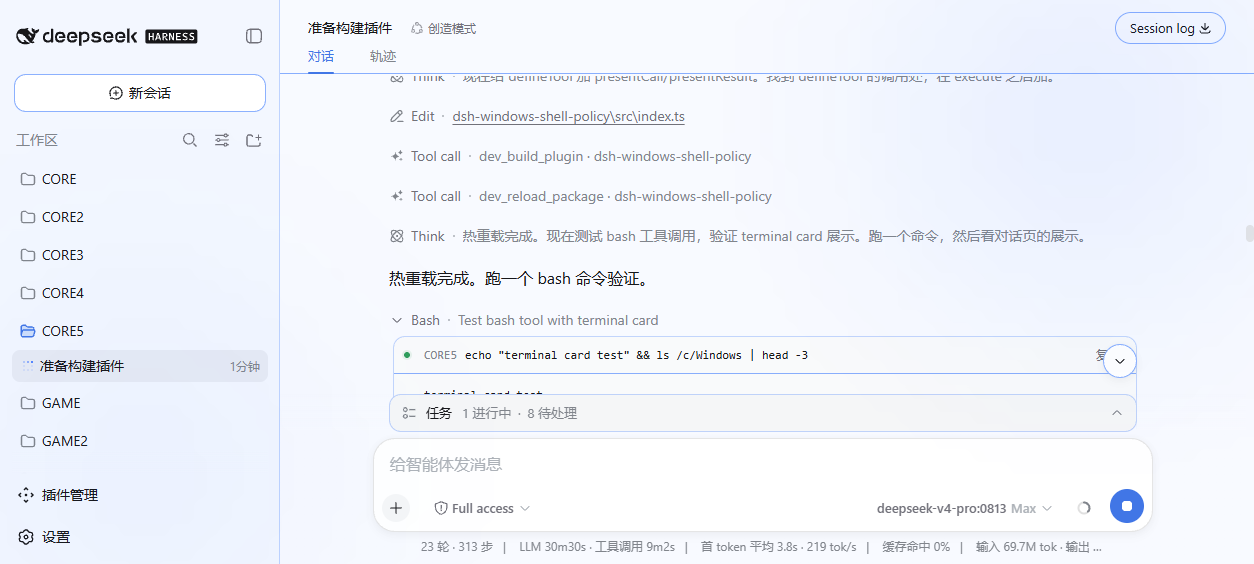
在 Windows 上使用 DeepSeek Harness 时,默认的 PowerShell 可能与 LLM 训练中常见的 bash 语言不匹配,导致 agent 执行命令错误率上升。dsh-windows-shell-policy 插件自动探测 git-bash、MSYS2 或 Cygwin 环境,提供配置面板一键切换默认 Shell,动态注册 bash 工具并裁剪提示词,确保 agent 只面对一个 shell 工具。它支持配置持久化和无缝卸载,非常适合 Windows 开发者或数据科学家,用于提升 agent 命令执行效率与准确性,避免 Shell 差异问题。
截图预览
使用场景
- 在 Windows 开发环境中配置 AI agent 的默认 shell 以提升效率。
- 当 agent 执行 POSIX 命令出错时切换到 bash 环境。
- 为团队项目统一 shell 设置以减少兼容性问题。
适合人员
- 使用 DeepSeek Harness 的 Windows 开发者。
- 需要优化 agent 命令执行效率的数据科学家。
- AI 工程师和项目团队负责人。
相关插件

Aegis
GanyuanRan/Aegis
让 AI 编程代理更可信:编辑前对齐真实基线、完成时附验证证据,减少返工与不安全变更。
工作流
2026.08.26
★ 1133

dsh-agent-teams
NanmiCoder/dsh-agent-teams
将 DeepSeek Harness 会话变为队长,创建持久子代理团队,将目标拆分为依赖感知任务,并通过直接消息与 Web UI 协调执行。
工作流
2026.08.27
★ 1071
superdesign-skill
superdesigndev/superdesign-skill
为编码智能体赋予设计判断力,让 Claude Code、Cursor 等 70+ 智能体直接在终端生成与迭代高质量 UI、演示文稿和图形。
工作流
2026.08.26
★ 453
pi2dsh
weijiafu14/pi2dsh
让 Pi 生态的插件无需修改即可运行在 DeepSeek Harness 上,通过实现 Pi 公共扩展 ABI 的兼容层桥接两大生态,并检验 DSH 架构能力。
工作流
2026.08.27
★ 169