dsh-upload-file
在终端中运行以下命令:
dsh plugin install seeingrain/dsh-upload-file
将以下提示词粘贴到 DeepSeek Harness 对话框中:
运行 dsh plugin install seeingrain/dsh-upload-file 即可安装该插件,源码地址:https://github.com/seeingrain/dsh-upload-file
插件介绍
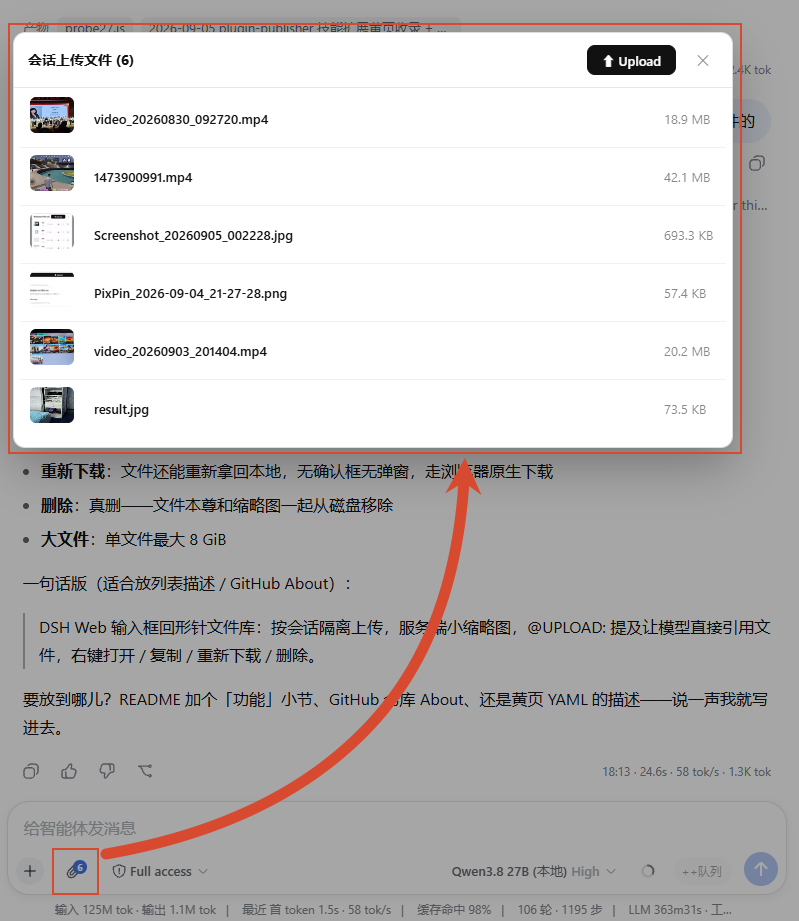
When DSH runs on a separate server, uploading a file into a chat used to mean a manual scp followed by pasting an absolute path into the message — a jarring break in the flow. dsh-upload-file adds a 📎 button beside the input box that opens a per-session file library: pick multiple files at once, watch a live progress bar, and see a thumbnail in the list (original image, a 5% frame for video, first page for PDF, all compressed under 10 KB). Type @ and the file name, and the model reads it directly — no more reciting paths by hand.
Storage is deliberately minimal: one hidden subdirectory per session, the file name is the sole identity, and there is no JSON index. Listing is just readdir plus stat sorted by mtime descending. Re-uploading a same-named file in the same session automatically appends a _1, _2 suffix so nothing gets overwritten; different sessions live in separate directories and never collide. Every upload is SHA-256 verified end to end, all path operations are guarded against directory traversal, and the session ID must be a strict UUID.
It is made for users who run DSH on a dedicated server: drop a file right into the chat, mention it with @, and let the model work on it — no terminal switch, no directory memorising, the whole loop stays in the conversation.
截图预览
使用场景
- 聊天中直接上传文件并用 @ 提及,模型即时读取无需贴路径
- 多文件批量上传,带进度条与图片/视频/PDF 缩略图列表
- 同会话重传同名文件自动加数字后缀,不同会话完全隔离
适合人员
- DSH 运行在单独服务器、需要频繁上传文件的用户
- 希望免去手动 scp 再贴路径的日常工作流
- 想在聊天中快速引用文件而无需切换到终端的开发者
相关插件

为编码智能体提供跨工具记忆层,索引本地已有会话历史,在文件编辑、命令执行前后自动召回相关上下文,无需手动检索。

面向 AI 代理的可追溯、可搜索跨会话记忆插件,将对话知识构建为带类型知识图谱,按需召回相关子图而非重放全部历史,原生集成 DeepSeek Harness。
为 DSH 的 AI 赋予跨会话长期记忆,管理待办与技能,并支持多会话协同、外部 AI 派单与无限画板,越用越懂你。

dsh-mnemon 为 DeepSeek Harness 提供三层可插拔、Agent 驱动的记忆系统:运行时上下文、项目文档、可替换记忆空间,支持九种长期提供商。