dsh-launcher
在终端中运行以下命令:
dsh plugin install songer522/dsh-launcher
将以下提示词粘贴到 DeepSeek Harness 对话框中:
在终端运行 dsh plugin install songer522/dsh-launcher 即可安装本插件,完整源码仓库地址为 https://github.com/songer522/dsh-launcher
插件介绍
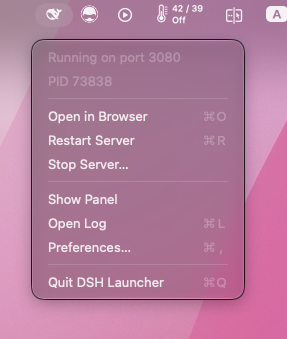
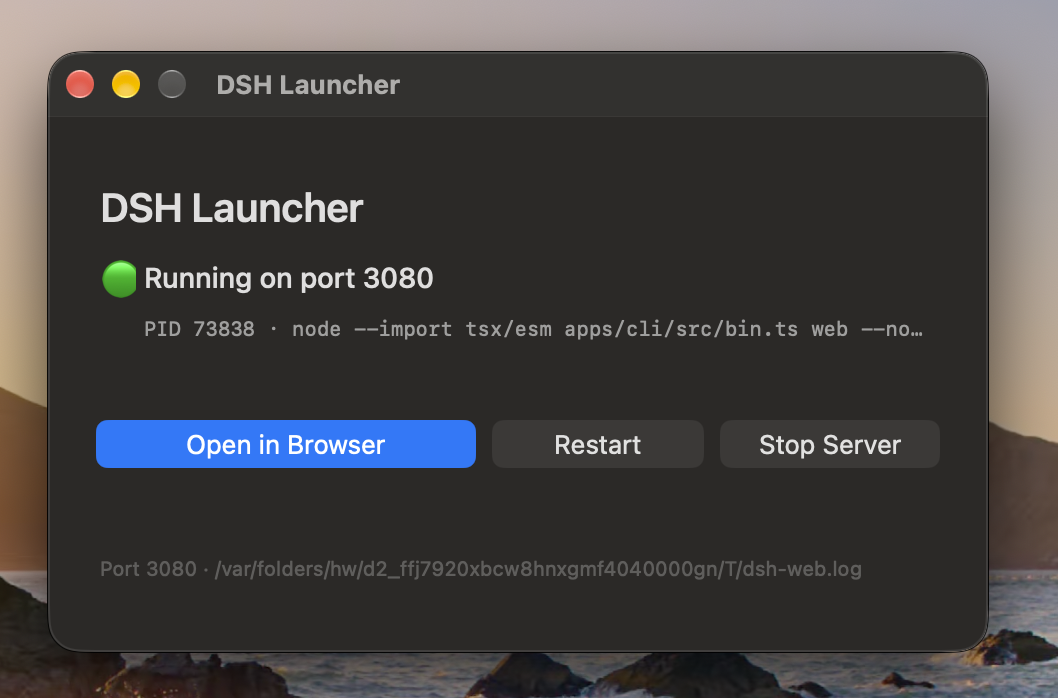
Every time you want to use DeepSeek Harness from source, the ritual is the same: open a terminal tab, type the command, dig the tokenized URL out of the logs, go back to the tab after a pull to kill and restart, and remember to stop the server when you are done. The terminal was never the point of the tool — it was just the tollbooth in front of the browser tab where the real work happens. dsh-launcher, paired with the macOS menu bar app in the same repository, collapses start, open-in-browser, restart, and stop into single clicks. The status icon reflects server state in real time, there is no Dock icon, and nothing sits in the way. Command, port, project directory, and target browser are all configurable, so it works just as well for vite, python -m http.server, or any other long-running local server.
The companion DSH host plugin runs inside the harness itself. Once the server begins listening it writes a small runtime.json containing the port, PID, and authenticated URL; when the server stops the file is removed. This means that even when you start the server from a terminal rather than from the menu bar app, the app can still open a browser tab with the correct launch token instead of hitting a 401. The plugin is optional — the app falls back to parsing its own startup log — but with it in place, managing servers across different launch sources becomes seamless.
Built for macOS developers who run DeepSeek Harness from source day to day, or anyone tired of context-switching between a browser tab and a terminal window to keep a local server alive. A single Swift file, zero dependencies, MIT licensed: compile, sign, done.
截图预览
使用场景
- 从菜单栏一键启动、重启或停止 DeepSeek Harness 本地开发服务器,无需打开终端
- 拉取新代码后点击重启,应用自动携带正确的鉴权 URL 打开浏览器标签页
- 用于管理 vite、python http.server 等任意长期运行的本地开发服务
适合人员
- 日常从源码运行 DeepSeek Harness 的 macOS 开发者
- 希望减少终端操作、用图形界面管理本地服务的开发者
- 频繁在拉代码后重启开发服务、厌倦手动复制带 token 的 URL 的工作流
相关插件
DSH 服务化侧边栏框架,提供文件工作台、内嵌浏览器、真实终端、Git 面板等完整工作台,并开放服务供插件扩展。

美观实用的 Claude Code 风格 TUI 插件:像素鲸鱼顶栏、流光大字、实时状态行、思考流式展开、时间回溯、上下文进度条与 TPS 仪表,零核心改动。

DeepSeek Harness 插件市场:浏览/搜索/一键安装社区插件与主题,支持更新、备份、热禁用、诊断与AI修复。

DSH Web 界面右下角常驻小鲸鱼余额挂件,自动显示 DeepSeek 余额、今日已用与每轮对话消耗,支持拖拽吸附与音效。