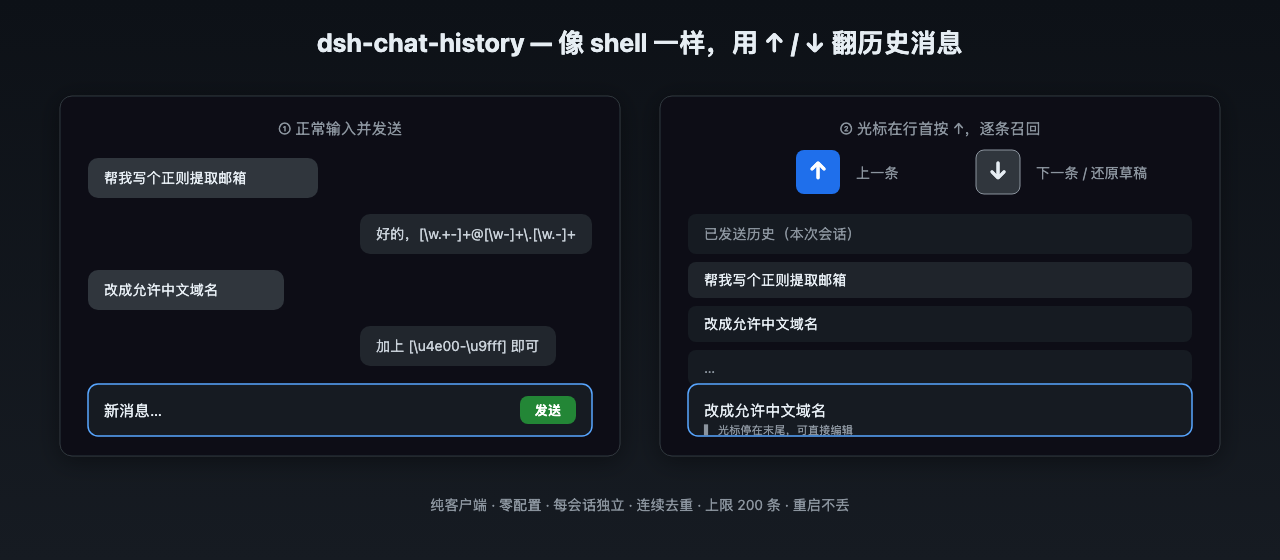
dsh-chat-history
在终端中运行以下命令:
dsh plugin install VioletScar-Hui/dsh-chat-history
将以下提示词粘贴到 DeepSeek Harness 对话框中:
在 DeepSeek Harness 中使用 dsh plugin install VioletScar-Hui/dsh-chat-history 安装,源码地址为 https://github.com/VioletScar-Hui/dsh-chat-history,装完刷新浏览器即可生效。
插件介绍
When you fire off many messages in a DSH conversation, scrolling back with the mouse to find that one earlier prompt is slow and breaks your flow. dsh-chat-history brings the shell-style Up/Down history workflow into the chat input box: place the cursor at the start of the line, press Up to walk back through previously sent messages, press Down to move forward or restore your in-progress draft. Duplicates are skipped automatically, each session keeps its own list capped at 200 entries, and the history re-seeds from the conversation on every page load—no disk writes, no host-side changes.
Beyond keyboard recall, a Locate button in the session header opens a side panel that lists every message you have sent in that session in order. Click any entry to scroll directly to it with a brief highlight. The plugin stays out of your way: arrow-key handling only fires when the cursor is at line start, not during IME composition, slash-command menus, or mid-text editing. The component renders nothing visible—it purely attaches side effects with zero DOM hacks.
Best suited for heavy DSH users who compose many prompts in a row, frequently revisit or reuse earlier messages, and prefer a keyboard-first workflow over extra UI chrome. Install it, refresh the browser, and the history is ready—no configuration, no host restart required.
截图预览
使用场景
- 连续发送多条消息后需要回看或复用之前某条提示词
- 长会话中快速定位自己之前发送的某条消息位置
- 偏好纯键盘操作、不希望界面新增按钮的使用习惯
适合人员
- 高频使用 DSH 进行多轮对话的重度用户
- 喜欢在输入框中翻阅历史消息的键盘流用户
- 希望插件无感增强、不改变界面布局的极简偏好者
相关插件
DSH 服务化侧边栏框架,提供文件工作台、内嵌浏览器、真实终端、Git 面板等完整工作台,并开放服务供插件扩展。

美观实用的 Claude Code 风格 TUI 插件:像素鲸鱼顶栏、流光大字、实时状态行、思考流式展开、时间回溯、上下文进度条与 TPS 仪表,零核心改动。

DeepSeek Harness 插件市场:浏览/搜索/一键安装社区插件与主题,支持更新、备份、热禁用、诊断与AI修复。

DSH Web 界面右下角常驻小鲸鱼余额挂件,自动显示 DeepSeek 余额、今日已用与每轮对话消耗,支持拖拽吸附与音效。