dsh-port-inspector
在终端中运行以下命令:
dsh plugin install ianho7/dsh-port-inspector
将以下提示词粘贴到 DeepSeek Harness 对话框中:
在 DeepSeek Harness 终端中运行 dsh plugin install ianho7/dsh-port-inspector 即可安装该插件(开源地址:https://github.com/ianho7/dsh-port-inspector)。
插件介绍
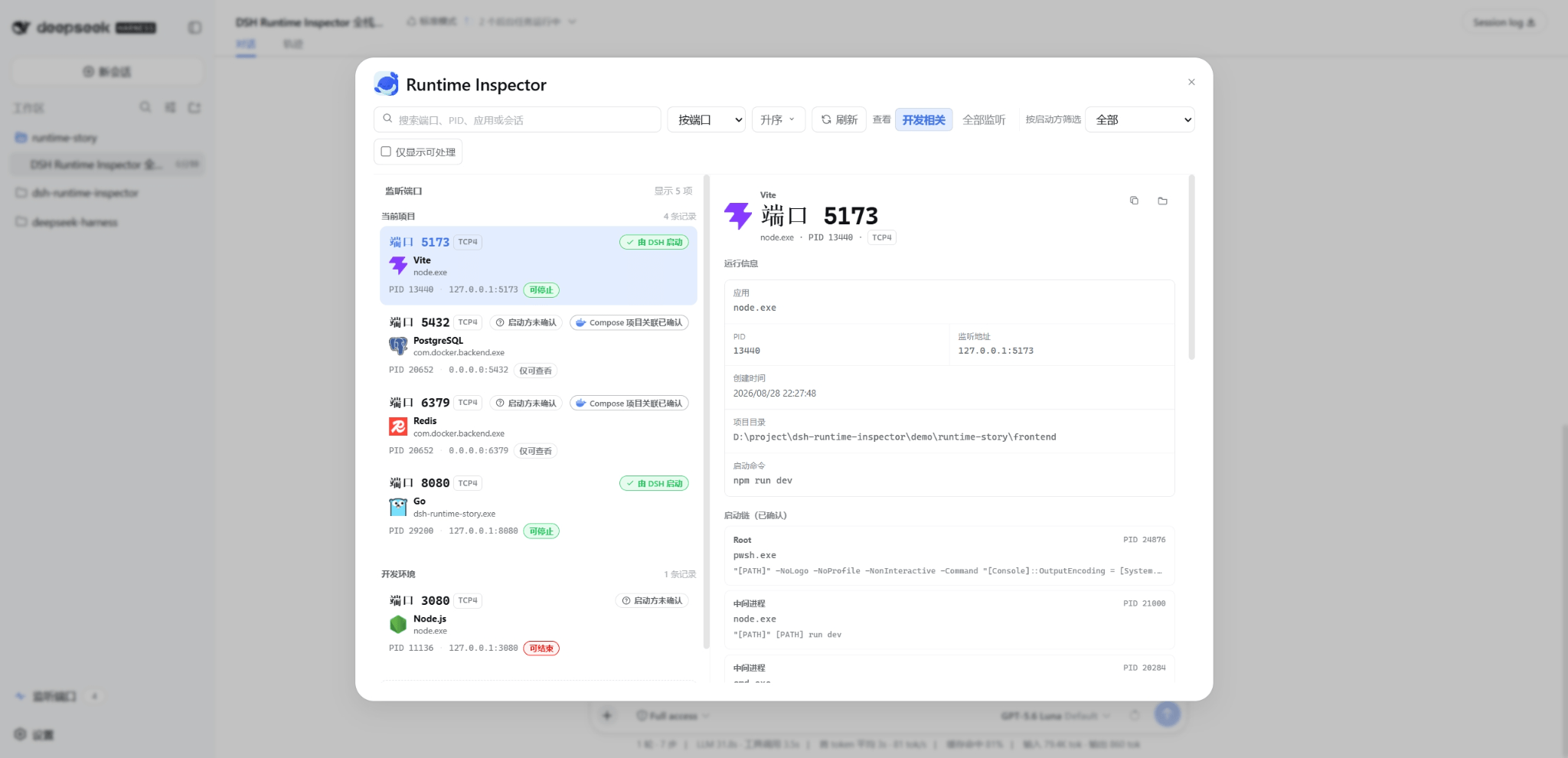
Once a Coding Agent spins up several local dev servers, familiar questions pile up: which Vite instance is the browser actually hitting? Why is port 8080 still listening after the task is done? Which of the three node.exe entries in Task Manager belongs to which project? DSH Port Inspector closes this gap inside DeepSeek Harness Web by tracing every TCP listener back through the Agent tool call that started it, mapping each port to its application, project, Session, Turn, Call ID, and launch mode so you stop guessing at port ownership.
At its core, Port Inspector presents a consolidated view of listening ports across the project and the system, showing PID, application, and bind address, while distinguishing the current DSH session, other DSH sessions, and plain external processes. For DSH-managed Jobs and Terminals it performs identity-verified shutdown through the lifecycle owner; for external processes with complete identity evidence it allows a single same-user PID termination after a safety check. Additional capabilities include Docker Compose project association, a root-to-listener launch chain view, search/filter/sort by port, app, PID, project, and session, one-click copy of redacted details, and an automatic fresh scan after every action that reports whether the port was actually released.
It is built for developers who run DSH Web on Windows and regularly let their Agent start local dev servers, APIs, databases, or other tooling, especially those juggling multiple projects or DSH Sessions with same-named processes. If you need to resolve port conflicts without accidentally killing another project or service, Port Inspector separates attribution from action authority, recommends shutdown only when evidence is sufficient, and never auto-cleans background services or escalates to forced termination.
截图预览



使用场景
- 多 Session 并行开发时区分同名进程与端口归属
- Agent 启动本地服务后确认端口来源并安全停止
- 排查端口冲突后验证目标端口是否真正释放
适合人员
- 在 Windows 本地使用 DSH Web 的 Coding Agent 开发者
- 频繁让 Agent 启动开发服务器或多项目并行调试的团队
- 需要安全处理端口冲突且不想误杀其他服务的人
相关插件

面向 DeepSeek-V4.1/Flash 的网安红队基准评测插件,双层协同内核与零工具面架构,用于受控环境探查模型安全边界。
DeepSeek-V4 安全红队破甲插件,以代码形式化映射与零特征提示词实现无条件输出,仅供授权安全测试与学术研究。

dsh-auto-mode 在官方 workspace-write 沙箱上增加 Auto 审批模式,对语义风险自动分类、必要时询问并拒绝破坏性操作,兼顾开发流畅与安全。

DSH 撤销/回退系统:配置与插件代码快照,一键撤销/恢复/回退任意版本;消息级撤回、密钥脱敏、安全模式与局外 WebUI/GUI/CLI 急救工具,DSH 崩溃也能自救。