totoTheCat
在终端中运行以下命令:
dsh plugin install ZutoMayoo/totoTheCat
将以下提示词粘贴到 DeepSeek Harness 对话框中:
在终端执行 dsh plugin install ZutoMayoo/totoTheCat(源码:https://github.com/ZutoMayoo/totoTheCat),安装完成后重启 dsh web 即可在界面中看到托托桌宠。
插件介绍
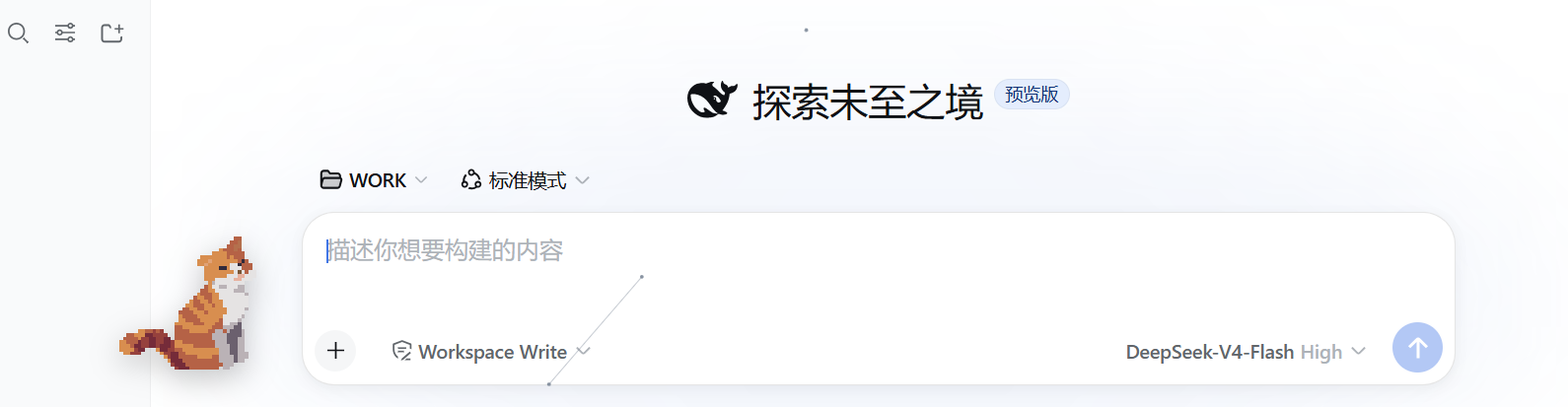
Tired of a bare, sterile work session in DeepSeek Harness? totoTheCat drops a quiet little companion named Toto right into the web UI. Zero dependencies, zero build step — install, restart dsh web, done. It sits there like a sticker and says nothing, just keeps you company while you work.
Toto supports sprite-sheet animation and free dragging across the screen; its entire look is defined by transparent PNGs you drop into assets/, so swapping in new art is as simple as replacing files. Click on Toto and two panels slide out: a Pomodoro timer with presets from 5 to 120 minutes and an automatic 5-minute rest, plus a 30-fact trivia collection that unlocks one entry per level. Earning XP for every focused minute, you can light up all 30 entries in roughly six hours of work sessions. Progress is persisted on the host side and shared across Chrome, Edge, and multiple tabs.
If you live in dsh web for code or tasks and want a low-key desktop buddy with a lightweight focus timer — plus a small collect-a-facts dopamine loop — Toto fits the bill. It respects the system reduced-motion preference, auto-switches between English and Chinese to match DSH, uses only standard Web APIs, and runs out of the box in any Chromium-based browser.
截图预览
使用场景
- 在 dsh web 中长时间工作时,用番茄钟保持专注节奏
- 用自定义 PNG 序列帧给工作界面换一个独一无二的桌宠形象
- 边专注边攒经验,逐步解锁托托的 30 条趣味事实
适合人员
- 日常使用 DeepSeek Harness web profile 进行开发或写作的人
- 喜欢轻量桌宠和自定义外观、不想装重型应用的极客
- 想用番茄钟辅助专注、又希望有点收集成就感的远程办公者
相关插件

鲸鱼少女是 DSH Web GUI 右下角的桌面宠物,可拖拽、喂食、玩耍;完成任务、会话与陪伴时间会累积为等级、头衔和记忆。

将本机 Wallpaper Engine 壁纸渲染为 DSH 界面背景,支持视频、网页及场景壁纸,配液态玻璃与丰富调节。

为 DeepSeek Harness 打造的 WebGPU 海洋皮肤,保留五波 Gerstner 海浪,支持半透明主题、昼夜循环与快速调节,可作插件或扩展安装。

为 DSH Web GUI 会话页提供 Galgame 风格对话视图与场景元素可视化编辑器,内置可实时同步的编辑模式。