dsh-stock-mentions
在终端中运行以下命令:
dsh plugin install mingzeng21/dsh-stock-mentions
将以下提示词粘贴到 DeepSeek Harness 对话框中:
在 DSH Web 终端中运行 dsh plugin install mingzeng21/dsh-stock-mentions 即可安装本插件,项目源码见 https://github.com/mingzeng21/dsh-stock-mentions
插件介绍
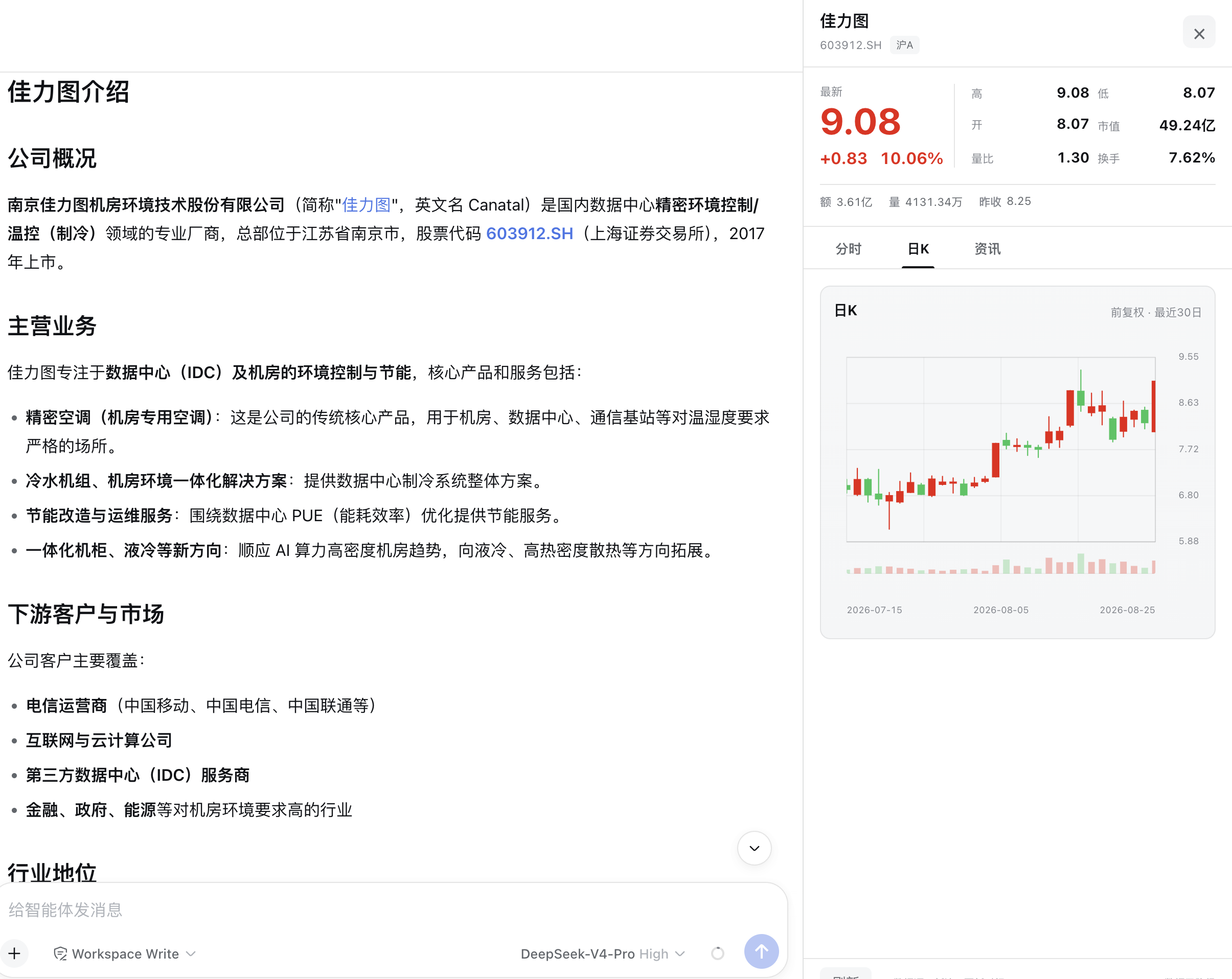
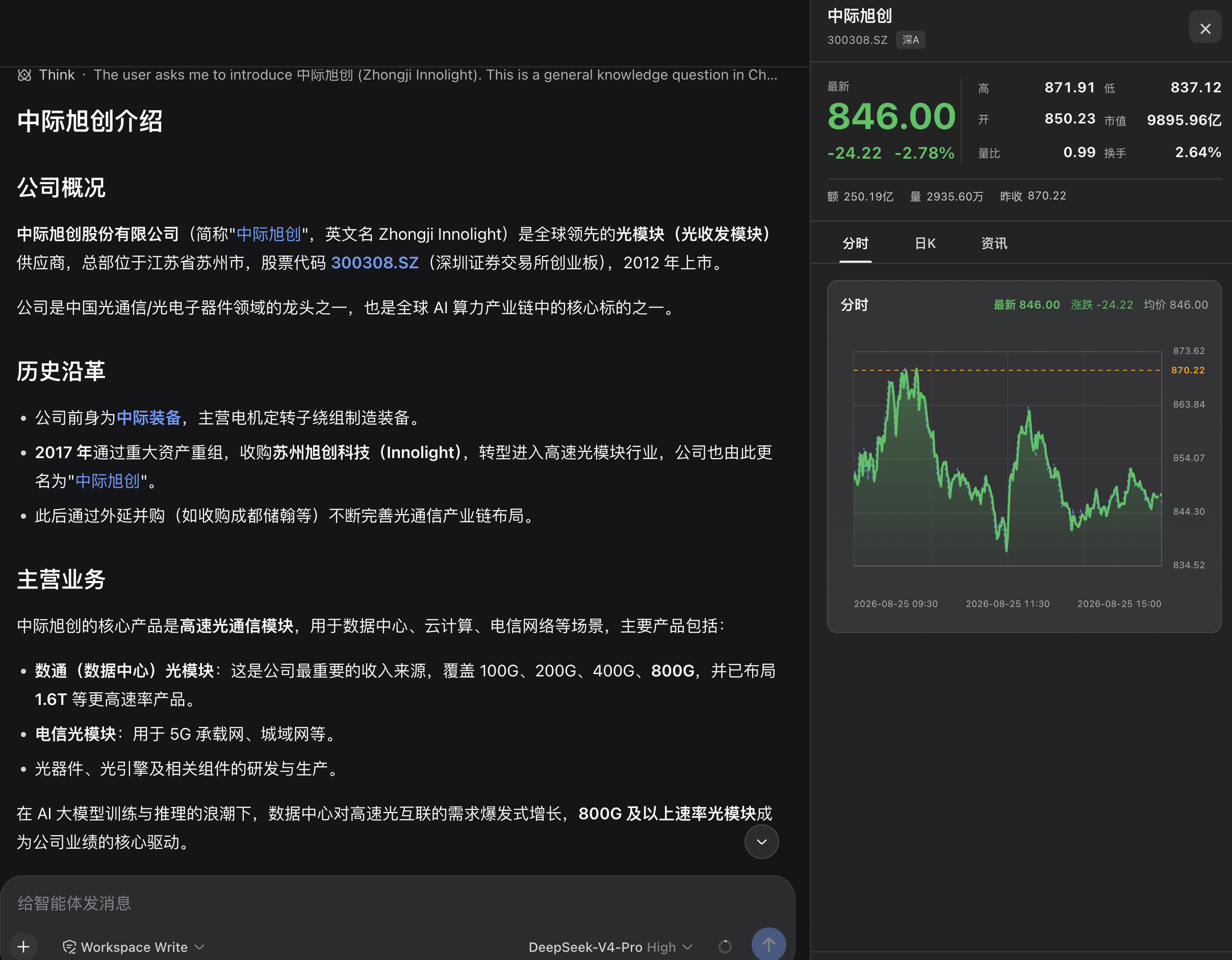
Talking stocks with DeepSeek Harness can feel fragmented: the assistant mentions Kweichow Moutai or code 600519 as plain text, and checking a quote means opening a browser, typing the code, and waiting for a page to load. dsh-stock-mentions bridges that gap by automatically detecting confirmed Shanghai and Shenzhen A-share names and codes in the assistant’s replies and rendering a clickable stock button in the response action area. One click expands a quote panel on the right side, keeping you inside the conversation.
The panel displays a full set of quote fields including latest price, change amount and percentage, high, low, open, market cap, volume ratio, turnover rate, trading value, volume, and previous close, along with an intraday chart and a 30-trading-day forward-adjusted daily K-line. A news section shows the ten most recent articles by default. All data requests are routed through the Host via a versioned RPC channel with built-in timeout, cancellation, caching, response validation, and multi-source fallback, so the browser never contacts a quote website directly and no API key or credential is required. The plugin is strictly scoped to ordinary A-shares on the Shanghai and Shenzhen exchanges, excluding indices, funds, ETFs, bonds, B-shares, and Beijing Stock Exchange securities, and it ignores user messages, code blocks, formulas, and other non-assistant contexts to minimize false positives.
If you regularly ask the assistant to analyze individual stocks, review price action, or compile investment notes, this plugin removes the repetitive copy-code-switch-window-paste-refresh cycle and brings quotes one click away within the conversation flow. The plugin is read-only: it offers no trading, watchlist, portfolio, or investment-advice features, and panel state lives only in the current session without being written into the conversation log.
截图预览
使用场景
- 在助手回答中点击股票名称,直接打开报价、分时图和日 K 线,无需切换浏览器
- 与助手讨论个股分析时,侧边面板同步展示最新价格、涨跌幅和 30 日前复权 K 线
- 查看助手分析的同时,浏览个股最新资讯,省去打开行情软件的步骤
适合人员
- 经常与助手讨论沪深 A 股个股的投资者和分析师
- 希望减少复制代码、切换窗口、粘贴刷新等繁琐步骤的用户
- 在 DSH 工作流中围绕股票分析构建自动化流程的开发者
相关插件
DSH 服务化侧边栏框架,提供文件工作台、内嵌浏览器、真实终端、Git 面板等完整工作台,并开放服务供插件扩展。

美观实用的 Claude Code 风格 TUI 插件:像素鲸鱼顶栏、流光大字、实时状态行、思考流式展开、时间回溯、上下文进度条与 TPS 仪表,零核心改动。

DeepSeek Harness 插件市场:浏览/搜索/一键安装社区插件与主题,支持更新、备份、热禁用、诊断与AI修复。

DSH Web 界面右下角常驻小鲸鱼余额挂件,自动显示 DeepSeek 余额、今日已用与每轮对话消耗,支持拖拽吸附与音效。