whale-desktop-kit
在终端中运行以下命令:
dsh plugin install z-time-007/whale-desktop-kit
将以下提示词粘贴到 DeepSeek Harness 对话框中:
在 DeepSeek Harness 中运行 dsh plugin install z-time-007/whale-desktop-kit 即可安装,源码地址为 https://github.com/z-time-007/whale-desktop-kit
插件介绍
DeepSeek Harness is a capable backend service, but it lives in a terminal by default. Wanting a wallpaper, a draggable desk pet, or a quick glance at your account balance still requires a context switch back to the command line. whale-desktop-kit fills that gap by layering a full desktop experience on top of DSH, so opening it for the first time feels less like peeking at a web console and more like launching a native desktop application.
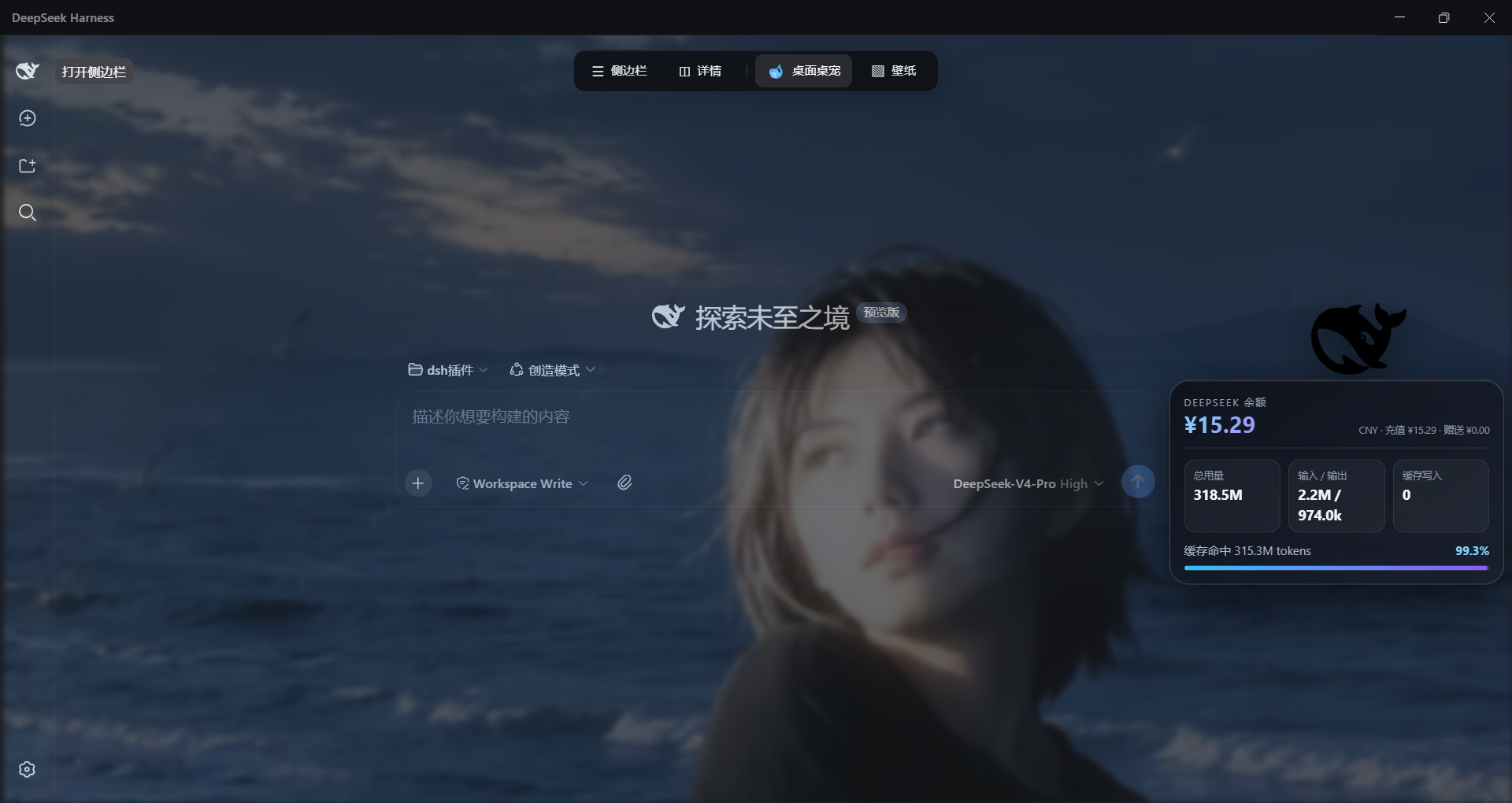
The suite ships six core modules. The desktop-experience module handles locally imported wallpapers (PNG, JPEG, WebP, GIF; SVG and remote URLs rejected after a safety scan and a transcode pass), blur and glassmorphism sliders, independent opacity controls for the input bar and the sidebar, and a dock that slides in when your cursor touches the top edge of the screen. The star of the show is a transparent, always-on-top black-whale desk pet that detaches from the DSH window and wanders freely across your Windows desktop: click it for a live balance, token usage, and cache-hit summary; right-click to refresh or dismiss. A personal-assistant module adds a local to-do list, sticky notes, daily summaries, and one-click document generation (text, docx, pptx, xlsx), all sandboxed to a fixed workspace directory. The remaining pieces cover safe read-only Office document parsing, automatic approval for read-only tool calls to cut down confirmation interruptions, and a native frameless desktop app with its own title bar, edge-dock auto-hide, system-tray management, auto-start on boot, and a single-instance lock.
If you use DeepSeek Harness day to day, find the pure-terminal workflow limiting, and want wallpaper beautification, a desktop pet, and light productivity helpers without altering DSH backend logic, this plug-in is worth a quick setup. It is MIT-licensed, ships no keys or conversation logs, degrades gracefully when the optional sharp image library is missing, and targets DSH 0.1.0-rc.6.
截图预览
使用场景
- 将 DSH 从浏览器标签页升级为带壁纸、托盘和无边框窗口的原生桌面体验
- 通过桌面黑鲸鱼宠物随时查看余额、token 用量与缓存命中率
- 本地生成 docx/pptx/xlsx 文档、管理待办便签,并对只读操作自动放行减少打断
适合人员
- 日常使用 DeepSeek Harness 的 Windows 用户
- 偏好图形化界面、希望减少命令行操作的用户
- 需要本地文档生成与轻量生产力辅助的技术用户
相关插件
DSH 服务化侧边栏框架,提供文件工作台、内嵌浏览器、真实终端、Git 面板等完整工作台,并开放服务供插件扩展。

美观实用的 Claude Code 风格 TUI 插件:像素鲸鱼顶栏、流光大字、实时状态行、思考流式展开、时间回溯、上下文进度条与 TPS 仪表,零核心改动。

DeepSeek Harness 插件市场:浏览/搜索/一键安装社区插件与主题,支持更新、备份、热禁用、诊断与AI修复。

DSH Web 界面右下角常驻小鲸鱼余额挂件,自动显示 DeepSeek 余额、今日已用与每轮对话消耗,支持拖拽吸附与音效。