dsh-plugin-no-workspace
在终端中运行以下命令:
dsh plugin install SpookySandwich/dsh-plugin-no-workspace
将以下提示词粘贴到 DeepSeek Harness 对话框中:
在 DeepSeek Harness 中执行 dsh plugin install SpookySandwich/dsh-plugin-no-workspace 即可安装,开源仓库地址为 https://github.com/SpookySandwich/dsh-plugin-no-workspace ,安装或升级后重启 DSH 使宿主端和客户端代码同时重新加载。
插件介绍
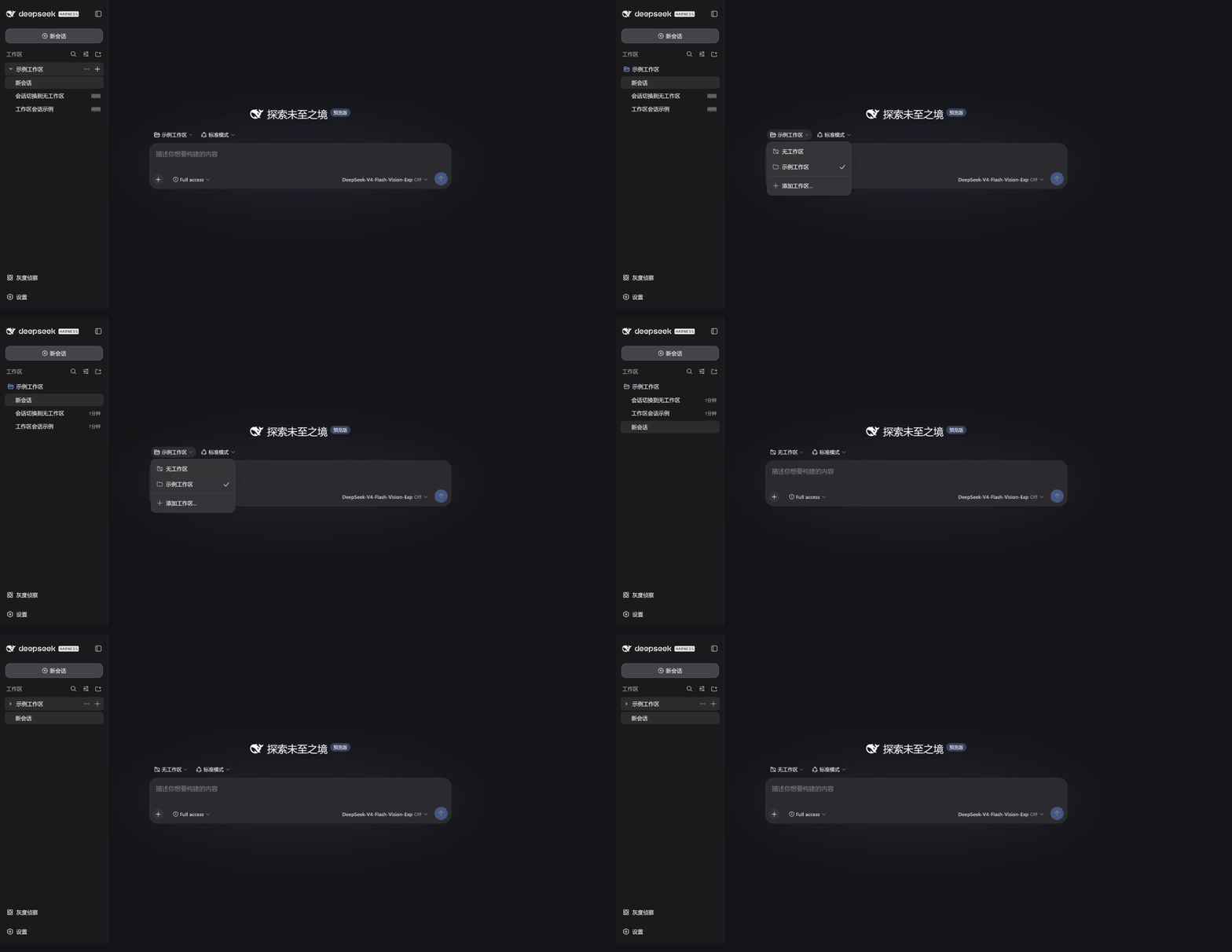
By default, DeepSeek Harness forces every session into a workspace; sessions that do not belong end up trapped in a phantom "Ungrouped" folder that mimics a directory but is entirely fictional. dsh-plugin-no-workspace elevates "no workspace" to a true first-class state: independent sessions appear as top-level entries in the sidebar, never inheriting the current or most-recent workspace and never wrapped in a bogus container. Clicking "New Session" at the top gives you a clean standalone conversation with input, model selection, and attachments ready to use immediately; switching the workspace selector to "No Workspace" detaches an existing session losslessly, preserving every event, draft, and piece of context.
The plugin is deliberately lightweight. It wraps DSH's already-registered slots rather than replacing the sidebar or fabricating directory structures, so native workspace features such as search, drag-and-drop, sorting, archiving, and the directory picker remain completely untouched. New standalone sessions use the user's home directory as a neutral execution path, avoiding any accidental pollution of project folders. The UI automatically localizes the label to your display language, showing "No Workspace" or "无工作区" as appropriate.
This plugin is a good fit for developers who often want to ask a quick question, brainstorm across projects, or simply start a conversation without first creating a folder to house it. It has been verified against DSH 0.1.1-rc.2 and confirmed to coexist peacefully with other client plugins such as dsh-plugin-message-edit, dsh-plugin-marginalia, and dsh-plugin-rollout-scout.
截图预览
使用场景
- 点击顶部新建会话,立即获得不继承任何工作区的独立对话
- 在工作区选择器中切换为无工作区,将现有会话无损移出
- 收起所有工作区后,独立会话仍作为一级条目保留在侧边栏
适合人员
- 经常想快速提问或头脑风暴、不想先建文件夹的开发者
- 多项目并行、需要跨工作区独立对话的 DeepSeek Harness 用户
- 希望保持原生工作区体验的同时增加灵活会话方式的进阶用户
相关插件
DSH 服务化侧边栏框架,提供文件工作台、内嵌浏览器、真实终端、Git 面板等完整工作台,并开放服务供插件扩展。

美观实用的 Claude Code 风格 TUI 插件:像素鲸鱼顶栏、流光大字、实时状态行、思考流式展开、时间回溯、上下文进度条与 TPS 仪表,零核心改动。

DeepSeek Harness 插件市场:浏览/搜索/一键安装社区插件与主题,支持更新、备份、热禁用、诊断与AI修复。

DSH Web 界面右下角常驻小鲸鱼余额挂件,自动显示 DeepSeek 余额、今日已用与每轮对话消耗,支持拖拽吸附与音效。