dsh-updater-npm
在终端中运行以下命令:
dsh plugin install SiriusWJ/dsh-updater-npm
将以下提示词粘贴到 DeepSeek Harness 对话框中:
在 DeepSeek Harness 终端中执行 dsh plugin install SiriusWJ/dsh-updater-npm 即可完成安装,插件源码详见 https://github.com/SiriusWJ/dsh-updater-npm
插件介绍
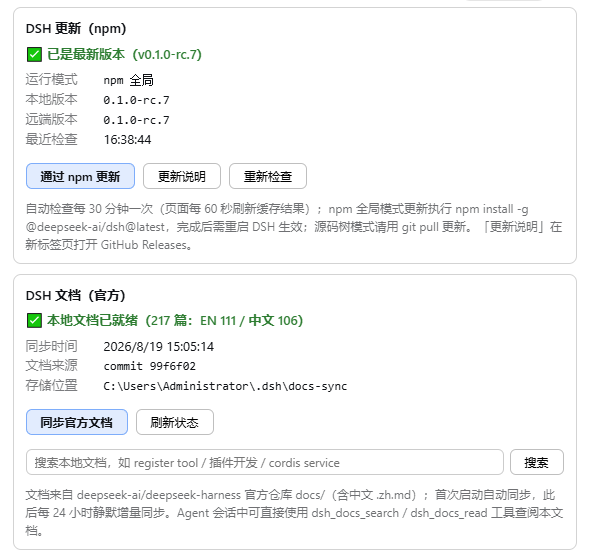
Keeping DeepSeek Harness up to date and its documentation at hand used to mean juggling npm commands in a terminal and tab-switching to a GitHub repository. dsh-updater-npm folds both chores into the DSH settings page so maintenance becomes a glance rather than a ritual.
On the update side, the plugin polls npm for the latest @deepseek-ai/dsh release, flags a new version with a red dot, and executes a global install with live npm output streaming. On Windows it uses a staged atomic swap to sidestep EBUSY lock conflicts; elsewhere it reinstalls in place and offers a one-click restart via PowerShell or /bin/sh. If you run DSH from a source tree, the plugin detects that mode and routes you to git pull instead, and it guards against multi-copy environments by targeting only the running instance. On the docs side, it incrementally syncs the official documentation (skipping unchanged files by GitHub blob sha) into your local workspace, then registers dsh_docs_search and dsh_docs_read as model tools so you can query and read documentation directly inside the conversation without switching context.
Built for engineers who keep DSH in their daily workflow—tweaking configuration, looking up API details, or citing official docs without leaving the terminal. The UI and tool output are bilingual (Chinese / English) and follow your system language automatically.
截图预览
使用场景
- 在设置页一键将 DSH 更新到最新稳定版并自动重启
- 在对话中直接搜索并阅读 DSH 官方文档
- 在 npm 全局或源码树模式下安全更新而不影响当前运行实例
适合人员
- 日常依赖 DSH 进行 AI 辅助开发的工程师
- 需要频繁查阅 DSH 官方文档而不想切换标签页的开发者
- 多套 DSH 环境并存、需避免更新错副本的团队
相关插件

为 DeepSeek Harness 打造的免费联网搜索插件,支持网页搜索、X 搜索与页面抓取,免注册免 API Key,多引擎自动故障转移。

AnySearch 驱动的 DeepSeek Harness 联网插件,借助原生 web_search/web_fetch 实现实时搜索、内容清洗、垂直搜索与并发批量搜索,免 API key 快速开始。
Pixel-perfect 网页克隆工具,基于 agent harness 将任意网页克隆为可评分的 React 全页面副本。

DeepSeek Harness 会话费用统计插件,中英双语界面,支持预算、官方与自定义 Provider 余额、OpenCode Go/Coding Plan 额度、峰谷计价与提醒、历史统计等。